


Truist Mobile
4.839.66K Reviews
App Specs
- Version
- Varies with Device
- Updated On
- License
- Free
- Downloads
- 1,000,000+
- Developer
- Truist Financial Corporation
- Categories
- Finance
- Platform
- Android, iOS
Screenshots
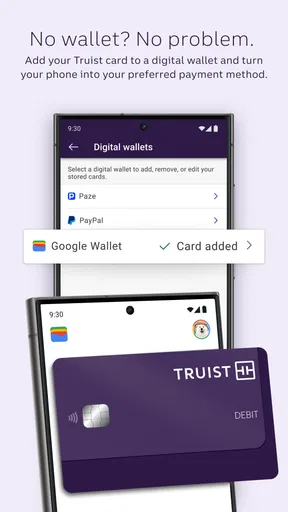
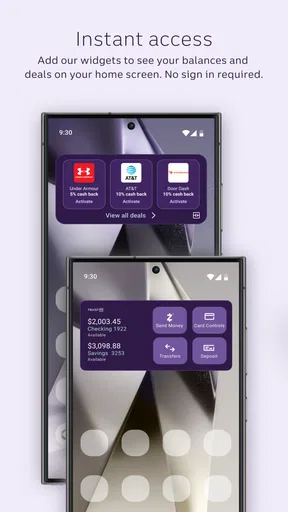
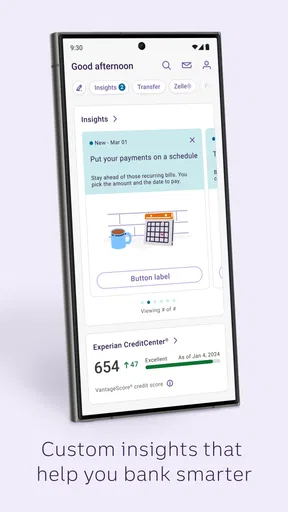
 Analysis by AppCompare
I approach any banking app a little differently from a shopping or entertainment app: convenience matters, but so does knowing what I’m doing when a screen shows private financial details. Truist Mobile is Truist Financial Corporation’s free finance app, and its role is straightforward: let customers handle common banking tasks on a phone instead of making every routine check or payment a desktop chore. It has a 4.8 average from around 370,000 ratings, with over a million installs, but those figures are only a starting point; what matters day to day is whether its tools fit the way you actually manage an account.
What to consider before making it your main banking app
I’d look at this app first if you already bank with Truist and want a mobile route to everyday account management. It is less compelling if you are choosing a bank from scratch based mainly on advanced budgeting, investment tools, or a consolidated view of accounts at several institutions. Those needs call for comparing broader financial platforms, not just asking whether one bank’s app handles routine tasks well.
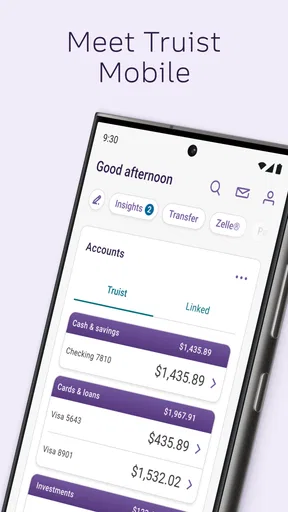
The useful distinction is between a bank app and a general-purpose money dashboard. Truist Mobile is built around banking with Truist: checking balances, moving money, paying bills, and handling a check through the phone. That focus can make ordinary tasks feel direct, while an independent finance app may be a better fit for someone who wants a wider household picture across multiple providers. I would decide based on where your accounts are and what you need to do most often, rather than assuming one app should do everything.
Everyday tasks where the phone earns its place
Picture getting a bill reminder while you are away from home. Instead of waiting until you can open a computer, you can check the account and deal with the payment from your phone. Or imagine receiving a paper check when a branch visit would be inconvenient: mobile deposit can make the phone camera part of that process. These are modest conveniences individually, but they matter when they remove a trip or prevent a task from slipping to later.
A practical habit is to use balance visibility as a checkpoint, not as a substitute for reviewing transactions. A quick glance can help before a purchase, but a balance alone does not explain what has cleared, what is pending, or what bills are coming. I’d pair occasional checks with a calmer review of account activity and alerts so that a reassuring number does not create a false sense of certainty.
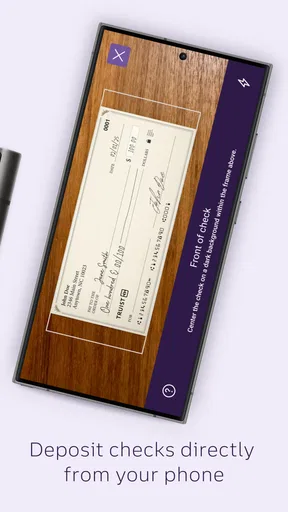
Mobile check deposit also works best when treated as a small process rather than a single tap. Find a well-lit surface, make sure the check is flat and readable, and review the captured images before submitting. That extra pause is useful because a blurry photo or a rushed capture can turn a convenient task into a frustrating retry. Keep the paper check until you have followed the bank’s instructions for handling it after deposit.
Privacy choices are part of convenience
A balance preview can save time, but it also changes what may be visible when you hand someone your phone or leave it on a table. I would think about whether that quick access suits your habits before enabling it, especially on a shared device or in public. Convenience is personal here: a feature that helps one person check money discreetly may expose more than another person wants shown at a glance.
Worth Reading Before You Choose

EA SPORTS FC Mobile 26 Is a Bigger Football Game, but It Takes Time

Flipboard Shows What News Apps Must Do Beyond the Feed

Switching to Android Auto Means Rethinking Your Driving Routine

Google Calendar Makes a Crowded Week Easier to Manage

Ludo King Makes the Most of the Minutes Between Plans

Baby Panda World Brings Quick Play to Modern Phones, but Its Game Library Feels Busy
Alerts deserve the same thought. They can make a due date or low balance harder to overlook, yet a notification on a lock screen may reveal financial context to someone nearby. I’d choose the alerts that genuinely help me act and review how they appear on my device. The aim is not to turn off useful reminders; it is to make sure their visibility matches your comfort level.
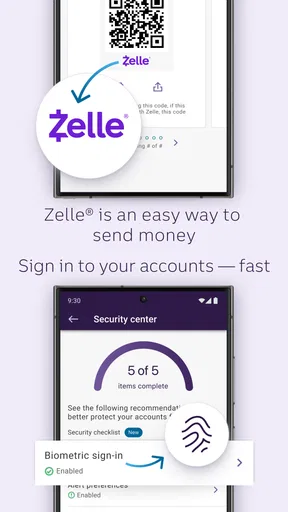
For account access, the published feature set includes multi-factor authentication and a way to disable access through the website if a phone is lost. That gives users a concrete action to take in a stressful situation, but it is worth knowing where to go before anything happens. I’d keep the bank’s website route in mind and make sure I can reach it from another trusted device. Security is not just a setting inside an app; preparation affects how quickly you can respond.
Fit, compatibility, and realistic expectations
The app is rated for Everyone and requires Android 9 or later, so it is aimed at a broad audience while still depending on a sufficiently current Android device. It was released on April 27, 2021. If you use an older phone, check compatibility before planning to rely on it; if you use iOS, confirm the relevant store’s current requirements rather than assuming Android details apply to your device.
In the finance category, many alternatives fall into two camps: the official app from your bank and independent services that bring accounts or planning features together. The former is usually the natural place for tasks tied to that bank; the latter may suit people who prioritize cross-bank tracking. Truist Mobile’s appeal is its direct connection to Truist banking, not a promise to replace every financial tool. I would keep a separate budgeting method if I need planning depth beyond the spending insights described here.
There is also a useful way to test whether the app is right for you without reorganizing your financial life around it. Start with low-stakes routines such as checking a balance or reviewing an alert, then see whether the navigation and timing feel dependable enough for your habits. Try a more consequential task only when you have time to read each screen carefully. That approach lets you judge the experience on your own phone and connection instead of relying solely on a rating or someone else’s routine.
Your Banking, Simplified
First off, let’s dive into the basics. Truist Mobile is all about bringing convenience to your fingertips. Whether you’re checking your balance, paying bills, or transferring money, this app has got you covered. The interface is sleek and user-friendly, making it a breeze to navigate. It feels almost like having a personal bank teller in your pocket.
Features That Stand Out
One of the things I love about this app is the quick view balance feature. Without even logging in, you can take a sneak peek at your account balance. It’s super handy when you’re in a rush and need to keep an eye on your finances.
Another standout feature is the mobile check deposit. Gone are the days of rushing to the bank before it closes. With just a snap of your camera, you can deposit checks directly into your account. It’s simple and, more importantly, reliable.
And for all you budgeting buffs out there, the app offers spending insights. This feature breaks down your spending habits, helping you stay on top of your budget and make smarter financial decisions.
Security You Can Trust
Security is a big deal when it comes to banking apps, and Truist Mobile doesn’t skimp in this department. The app employs multi-factor authentication, keeping your information safe and sound. Plus, if you ever lose your phone, you can easily disable access to your account, right from their website.
Personalized Alerts and Notifications
Let’s talk about alerts. Whether it’s a low balance warning or a payment due reminder, the app keeps you in the loop with personalized notifications. You can customize these alerts to fit your needs, ensuring you never miss a beat when it comes to your finances.
Room for Improvement
No app is perfect, and while Truist Mobile does a lot right, there are a few areas where it could improve. Occasionally, I’ve experienced slower load times, especially during high-traffic periods. It’s not a deal-breaker, but it’s something to keep in mind if you’re someone who’s always on the go.
Also, while the app covers most banking needs, it could benefit from integrating more financial planning tools. Features like goal tracking or investment management could really elevate its utility for more advanced users.
Final Thoughts
All in all, Truist Mobile is a solid choice for anyone looking to manage their finances on the go. It’s user-friendly, packed with useful features, and keeps security front and center. Sure, it has its minor hiccups, but the overall experience is pretty impressive. If you’re in the market for a banking app that keeps things simple yet effective, give Truist Mobile a try. It might just become your new financial sidekick!
Pros
- User-friendly interface for easy navigation.
- Robust security features ensure safe transactions.
- Real-time notifications for account activity.
- Wide range of financial tools and resources.
- Quick and responsive customer support.
Cons
- Occasional app crashes disrupt usage.
- Limited customization for dashboard layout.
- Some features require frequent updates.
- Not all services are available offline.
- Biometric login can be inconsistent.
FAQs for Truist Mobile
What features does the Truist Mobile app offer?
The Truist Mobile app provides a comprehensive suite of features including account management, mobile check deposit, bill payments, and money transfers. It also offers real-time alerts, spending insights, and secure login options such as facial recognition or fingerprint authentication. This makes managing your finances convenient and secure.
Is the Truist Mobile app secure for online banking?
Yes, the Truist Mobile app is designed with robust security features to protect your financial information. It includes multi-factor authentication, encrypted transactions, and automatic logout after inactivity. Users can also receive security alerts and notifications to monitor account activity, ensuring peace of mind while banking on the go.
Can I deposit checks using the Truist Mobile app?
Absolutely! The Truist Mobile app allows you to deposit checks directly from your smartphone. Simply take a photo of the front and back of the check, enter the amount, and submit. This feature saves time and provides the convenience of depositing checks without visiting a branch.
Does the Truist Mobile app support bill payments?
Yes, the app supports bill payments, enabling you to pay your bills directly from your account. You can schedule one-time or recurring payments, track payment history, and receive reminders. This functionality simplifies the bill-paying process, helping you stay on top of your financial obligations.
Is Truist Mobile app compatible with both Android and iOS devices?
The Truist Mobile app is fully compatible with both Android and iOS devices. You can download it from the Google Play Store for Android or the Apple App Store for iOS. The app is regularly updated to ensure compatibility with the latest operating systems and devices, providing a seamless user experience.


